
Overview
What the Aggregator is
How the Renteon Aggregator presents a brand that runs on several Renteon instances as one provider to brokers and websites, and gives the franchisor reports across all franchisees.
Last updated
Many rental brands are sold under one name but run in several Renteon instances: one per country, or one per franchisee, each with its own fleet, offices, pricelists and invoicing. A broker that wants to sell the brand does not want a separate contract, login, connection and code list for every instance. It wants one brand: one login, one API, one set of codes for locations, cars and extras, and one answer to each search.
The Renteon Aggregator gives it exactly that. It is a separate Renteon application with its own web address, its own users and its own API with documentation, and you sign in to it with the brand's agency code. It sits between the sellers (brokers, online travel agencies and the brand's own websites) and the brand's Renteon instances, and presents all of them as one provider. That makes it Renteon's franchise module: the franchisor sells and steers the network as one brand, and every franchisee keeps working in its own Renteon.
The Aggregator works in two directions:
- Sales. A broker searches and books across all instances of the brand as if they were one rental company. Each booking is created in the Renteon instance whose car the customer chose.
- Reporting. The bookings of every instance are copied into one report database, so the franchisor gets network totals and per-franchisee figures in one place. No single Renteon instance can give that.
This guide explains the idea and the words used in the Aggregator. The other guides of the Aggregator section cover each setup step. Start with Setting up a brand in the Aggregator: checklist.
One brand, many Renteon instances
In the Aggregator, a brand is a tenant. The menu and the API call it Provider; these guides say brand. Every Renteon instance of the brand is a connector of that brand. A connector is usually one country, and often an independent franchisee with its own fleet, offices, pricelists, partners and invoicing.
Take a brand with a Renteon instance in Croatia, run by the head office, and one in Greece, run by a franchisee. In the Aggregator, the brand gets two connectors, for example "Croatia" and "Greece". A broker that searches Athens airport gets the Greek franchisee's cars, and a broker that searches Zagreb airport gets the Croatian ones. Both see the same brand name and the same codes.
The brand does not have to work inside the franchisees' Renteon to sell their cars. For each connector, it maps the instance's offices, car categories, extras and pricelists to the Aggregator's shared codes once. After that, prices and availability are always read live from the franchisee's Renteon. A new price or a car that is no longer free reaches the brokers without anyone touching the Aggregator.
In practice there are two shapes:
- One connector. Most brands have a single Renteon instance. For them, the Aggregator is one API for all brokers in front of that instance.
- Many connectors. Franchise networks have one connector per franchisee. A large network can run dozens of connectors in many countries, some of them grouped under parent connectors.
The API documentation describes the same picture with three words:
- Provider: a rental brand that uses Renteon as its back-end application.
- Connector: one Renteon instance of a provider. A provider that operates in several countries has a separate Renteon instance in each.
- Consumer: a partner agency that connects to the API, in these guides a broker or a website.
Words used in the Aggregator
- Provider (the brand): the Aggregator tenant. Its code is what you type in Agency when you sign in, and it is the provider code that brokers send with every search.
- Connector: one Renteon instance of the brand, with its address and the Renteon login the Aggregator uses for it. See Connectors.
- Partner: a broker, an online travel agency or a brand website. Partners are kept in one list shared by all brands, so a broker exists only once in the whole Aggregator. Renteon support maintains the list under System → Code book → Partners (the screen title is Address book). A brand enables a partner on each of its connectors in Provider → Mappings → Partners.
- Mapping: per connector, the link between a shared Aggregator code and the matching entry in that Renteon instance. There are five kinds: locations, car categories, services, partners and pricelists.
- Rate code (Aggregator pricelist): the code of a pricelist that the brand defines once in the Aggregator, with a name and a Prepaid flag, for example the code CP-AG-01, named "Prepaid", on the demo brand. Brokers send and receive it as the pricelist code (PricelistCode in the API). It holds no prices. For each connector and each broker, it is mapped to the Renteon pricelist that applies there. That is how the same rate code serves many brokers on every instance of the network. See Rate codes and pricelist mapping.
- Franchises (on a connector): which of the Renteon instance's own franchises flow into the brand's reports. Renteon support sets them.
The shared codes are the same for every brand and every broker:
- location codes, such as HR-ZAG for Zagreb, HR-ZAG-ZAG for Zagreb airport or GR-ATH-ATH for Athens airport;
- car category codes in SIPP (ACRISS) form, such as CDMR;
- service codes, such as EQ-GPS for a navigation device or EQ-CHILDSEAT for a child seat.
The Croatian instance may call its child seat "Child seat 1-4 years" and the Greek one "Kids seat". Once both are mapped to EQ-CHILDSEAT, the broker sees one extra with one code, whichever franchisee offers the car.
The five mappings
Mappings are what turn several Renteon instances into one brand. Every instance keeps its own offices, car categories, extras, partners and pricelists, with its own numbers and names. The brand links them, connector by connector, to what brokers know. Three mappings translate the instance's own data and are the same for every broker. Two are set for each broker separately:
- Locations (Provider → Mappings → Locations): each office, meet and greet location and drop-off location of the instance gets a shared location code, such as HR-ZAG-ZAG. Several offices may share one code. Every place is mapped by hand. An office without a mapping is never searched.
- Car categories (Provider → Mappings → Car categories): each car category gets a SIPP code. Auto map maps at once every category whose SIPP code in Renteon exists in the Aggregator exactly as written. A category without a mapping is left out of every answer.
- Services (Provider → Mappings → Services): each extra, fee and insurance gets a shared service code, such as EQ-CHILDSEAT. Auto map maps the kinds of service that have only one code, such as car rental and the additional driver; equipment, fees and insurances are mapped by hand. An extra without a mapping is still sold, but as UNSPECIFIED.
- Partners (Provider → Mappings → Partners), per broker: the Renteon B2B user that the instance created for that broker or website. It decides whether the broker gets the instance's cars at all, and on which Renteon partner, with which pricelists, its bookings land. Without an active partner mapping, the connector is not asked for that broker.
- Pricelists (Provider → Mappings → Pricelists), per broker: which Renteon pricelist each of the brand's rate codes stands for in that instance. There is no automatic mapping. Without one, the connector returns nothing for that broker.
A mapping is made once. Prices and availability are then always read live from the instance. The Dashboard, the Aggregator's start page, shows per connector how much is mapped. Every day at 06:10 server time the Aggregator also switches off the mappings whose Renteon item has gone, for example an office that was deactivated or a pricelist that was unlinked from the broker, and such a mapping must be made again. Each mapping has its own guide: Mapping locations and car categories, Mapping services and extras, Partners: enabling brokers and websites on a connector and Rate codes and pricelist mapping.
What a broker gets
A broker gets one Aggregator login: a username and a password on its partner record, set by Renteon support. The same login works for the whole Aggregator, for every brand that has enabled that broker on at least one connector. A broker that sells five brands through the Aggregator still has one login.
With that login, the broker's system reads the setup data it needs:
- all shared location, service and car category codes;
- the list of brands on the Aggregator, with their logos;
- for one brand, but only when that brand has enabled the broker:
- its countries, locations and offices, with address, coordinates, pick-up and drop-off instructions, phone and e-mail, and working times read live from the franchisee's Renteon;
- its car categories and services, and the broker's own rate codes;
- the connectors on which the brand has enabled the broker, with their name, web address, countries, languages and currencies;
- the brand's terms and conditions.
For a brand that has not enabled the broker, the answer is "Provider … does not exist or did not enable your system.", where … is the brand's provider code. The Aggregator keeps a brand's setup data for 5 minutes, so a mapping you change can take up to 5 minutes to appear in it.
Brokers see the names of your connectors, so give connectors names that make sense to outsiders. The logo and the terms and conditions come from Provider → Code book → Settings (see Users, roles and brand settings). For a broker's developers, you can also download Provider → Code book → Export codes, an Excel workbook with the location, car category and service codes your brand has mapped. The technical description of the API is under Documentation → API documentation. It is the Aggregator's own address followed by /swagger and opens without an Aggregator user, so you can send that link to the broker's developers.
How a search becomes one answer
The broker sends one search: the pick-up and drop-off location codes, the dates, whether the booking is prepaid, and the code of the brand. The brand code is required. The broker may also send a city code, such as HR-ZAG, to search the offices under that city. For each connector, the Aggregator then searches at most three of those offices, airports first. When the pick-up and drop-off offices differ, it searches two of each.
The Aggregator then decides which connectors to ask. It asks a connector only when all of these hold:
- The connector has active location mappings under both codes: an office marked Pickup location under the pick-up code and one marked Drop off location under the drop-off code. Both must be on the same connector.
- The broker is enabled on the connector, with an active row in Provider → Mappings → Partners.
- The connector is active and belongs to the brand named in the search.
It asks all these connectors at once, each with the broker's own Renteon B2B user in that instance (taken from the partner mapping), and waits at most 5 seconds. It then merges the answers into one list, in the shared codes and with the brand's rate codes. Prices always come live from each franchisee's Renteon; the Aggregator stores none. Each offer carries a ConnectorId, which names the connector that made the offer, and the Aggregator's own office ids. The broker sends both back to book, and keeps the ConnectorId with the booking.
What this means in practice:
- A connector that answers late, or fails, is left out of the answer.
- A Renteon car category without a car category mapping is dropped from the answer.
- An extra without a service mapping comes back under the code UNSPECIFIED, named "Unspecified", instead of a shared code the broker knows.
- A connector on which the broker has no pricelist mapping returns nothing for that broker.
- A one-way rental from one franchisee's office to another franchisee's office is never offered, because pick-up and return must be on the same connector. A search from Zagreb (the Croatian instance) to Athens (the Greek instance) returns no cars.
The connector's country and its franchises play no part in which connectors are asked. Only the location mappings, the partner mapping and the brand do. The details are in Mapping locations and car categories, Mapping services and extras and Rate codes and pricelist mapping.
Warning: Neither the broker nor the brand gets an error when a connector is left out. If a franchisee's cars never appear for a broker, first check that connector's partner, pricelist and location mappings for that broker.
Where the booking ends up
When the broker books, the booking is created in the Renteon instance that offered the car, the connector named by the ConnectorId. The Aggregator translates the shared codes back into that instance's office, car category and extras. It then sends the booking through that instance's B2B API, signed in as the broker's Renteon B2B user from the partner mapping.
In the franchisee's Renteon, the booking looks like any other partner booking:
- Its booking channel is Web service for a broker and B2C web for a brand website.
- Its partner is the Renteon partner that owns the B2B user: as Agency on a prepaid booking, as Commissioner on a pay-on-arrival booking. Renteon checks that the pricelist fits. A prepaid booking on a selling pricelist is refused with "Booking by agency cannot be created with selling pricelist.", and a pay-on-arrival booking on an agency pricelist with "Booking by commissioner cannot be created with agency pricelist."
- Nothing else marks it as a booking from the Aggregator. The franchisee turns it into a contract and invoices it in its own Renteon, as it does with every other partner booking.
Opening, cancelling and printing a booking also go to the connector named by the ConnectorId. That is why the broker keeps the ConnectorId next to the booking number.
How bookings of agencies and commissioners work in Renteon is described in Agency bookings. How Renteon decides that a car is free is described in How availability is calculated.
Brand websites
A brand's own booking website is a partner too, called a website partner. Its code usually ends in "web", like "demoweb" for "Demo website" on the demo brand. It uses the same API as the brokers, plus a few functions that only website partners may use: finance documents, payments, the pricelist history and opening a booking with the customer's e-mail or phone. Its bookings arrive in Renteon with booking channel B2C web.
Because the website goes through the Aggregator, one brand site can sell the fleets of every franchisee. A customer who books at Zagreb airport and one who books at Athens airport use the same site, and each booking lands in the right franchisee's Renteon. You enable the website on each connector like a broker, see Partners: enabling brokers and websites on a connector.
The franchise module
Selling the network as one brand is the first half of the franchise module. Three more things make the Aggregator a tool for running a franchise network.
Connector tree. A connector can have a parent. A parent connector groups franchisees, for example all instances of one country or of one master franchisee. Users linked to a parent connector are linked automatically to every connector created under it later, and to a connector moved to it from another parent. A connector that had no parent before is not linked this way; tick it for those users. A country manager therefore does not have to be updated each time a franchisee joins; they see the new connector after signing in again. See Connectors.
User restriction. On a user, in Provider → Code book → Users, tab Basic, panel Connectors, you tick the connectors the user may see. Ticking a parent ticks its whole branch. From the user's next sign-in, the Dashboard, the connector list, the connector list on the mapping screens, and every report and report filter show only those connectors. A franchisee's manager can sign in to the Aggregator and see only their own figures, while the head office sees the whole network. Renteon support (system users) always sees every connector. See Users, roles and brand settings.
Franchise reports. The franchisor's reports across all franchisees, described in the next section.
The word "franchise" has two meanings in the Aggregator:
- At brand level, the franchisor is the Aggregator tenant (the brand), and a franchisee is a connector with its own Renteon instance. This is what these guides mean by franchisee.
- Inside one Renteon instance, Renteon has its own Franchises: brands or business units within that instance. On a connector, Renteon support chooses which of them flow into the brand's reports. This choice does not affect sales. To sell only the offices of one Renteon franchise through a connector, map only those offices.
Warning: A user with no connector ticked sees every connector of the brand, not none. Tick at least one connector for every user who should see only part of the network.
Reports for the franchisor
The second direction of the Aggregator is reporting. The bookings of every connected Renteon instance are copied into the Aggregator's report database. Each Renteon instance exports its new and changed bookings every 18 minutes, and the Aggregator imports them every 15 minutes, so a booking usually shows in the reports within half an hour.
Under Provider → Reports you find:
- Reports dashboard: 13 tiles, such as Received reservations, Issued contracts, Estimated income and Cancellation rate, with a trend chart and a breakdown for the selected tile. Below them, the Connector overview shows one row per franchisee with its figures and when its bookings were last exported and imported.
- Sales: Excel reports from the same data. Two of them exist only in the Aggregator: Bookings by connectors and Bookings by booking channels.
The filters work across the whole network: by connector (franchisee), by the country of the franchisee's instance, by booking channel, by office and by broker. The broker filter works across instances because each franchisee links every agency and commissioner in its Renteon (partners marked Agency or Agent in the address book) to the shared broker list, with the field Aggregator Partner. All bookings of one broker in the whole network are therefore one figure, although every instance has its own address book.
The report data holds every booking of the franchises ticked on the connector, from the office, the website and other partners, not only those that came through the Aggregator. Offers are not copied, and neither is a booking whose agency or commissioner has no Aggregator Partner.
Switching the report import on needs Renteon support, both in each franchisee's Renteon and on each connector. See Franchise reports in the Aggregator.
What the brand maintains and what Renteon maintains
Some data is shared by every brand on the Aggregator, so that all brokers speak the same codes. Renteon support maintains it under System → Code book:
- Locations, Services and Car categories (the SIPP codes);
- Partners: brokers and websites, including each broker's Aggregator login;
- Tenants: the brands themselves.
Renteon support also sets up the report import: the External API and Franchises panels on each connector, and the report export switch in each franchisee's Renteon.
The brand maintains everything under Provider: connectors, rate codes (Pricelists), all mappings, users, role groups and settings.
A brand cannot add a location code, a service code, a SIPP code or a broker itself; it asks Renteon support. A new broker comes with a Renteon release, because every Renteon instance must know the broker too.
Each franchisee maintains its own data in its own Renteon: offices, car categories, extras, pricelists, partners with their B2B users, and the Aggregator Partner field on its agencies and commissioners. When a franchisee adds an office or a pricelist, the brand maps it in the Aggregator before brokers can see it. When a franchisee removes one, the Aggregator switches the matching mapping off at its next daily check, as described in the mapping guides.
Signing in and finding your way
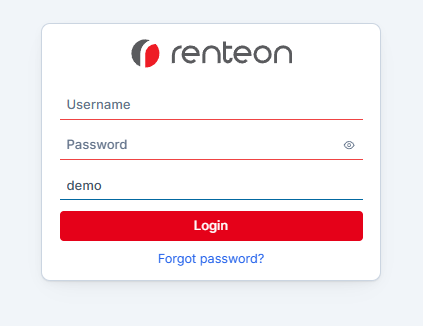
You sign in at the Aggregator's own address with Username, Password and Agency, which is the brand's code, and click Login. Renteon support signs in to your brand with the same agency code.
The menu has three sections, Provider, System and Documentation:
- Provider → Code book: Connectors, Pricelists, Users, Role groups, Settings and Export codes.
- Provider → Mappings: Pricelists, Car categories, Services, Locations and Partners.
- Provider → Reports: Reports dashboard and Sales.
- System: Code book and Development, shown to Renteon support only.
- Documentation → API documentation: the API description for brokers' developers, which opens in a new tab.
Most items of Code book and Reports appear only to users whose roles allow them, see Users, roles and brand settings.
The start page, Dashboard, shows the mapping status of each connector. For locations, car categories, pricelists and services it shows how many are mapped out of how many that Renteon instance has, and for partners how many are enabled. It is not the Reports dashboard. How to read it is described in Setting up a brand in the Aggregator: checklist.
These guides describe the new interface. The classic interface has the same labels, but its Reports group has only Sales, where the Reports dashboard is the first tile.

The other Aggregator guides, in the order you set a brand up:
- Setting up a brand in the Aggregator: checklist
- Connectors
- Mapping locations and car categories
- Mapping services and extras
- Partners: enabling brokers and websites on a connector
- Rate codes and pricelist mapping
- Users, roles and brand settings
- Franchise reports in the Aggregator
On the Renteon side of each instance: