
Finance
Lock billing date
Keep a contract billed up to its planned return date when the car comes back early, or bill up to an agreed later date, while the actual return stays as it happened.
Last updated
When you close a contract, Renteon recalculates the price from the moment the car actually came back. If the car comes back early, the rental gets shorter. With most pricelists a shorter rental has a different daily rate and a lower total. For a customer who has already paid, and been invoiced, for the whole booked period, the contract and the invoice no longer match.
Two options on the contract let you decide what is billed in that case:
- Lock billing period is a checkbox. When it is ticked, an early return does not shorten the billed period. The contract stays billed up to the planned return date (Date est.IN).
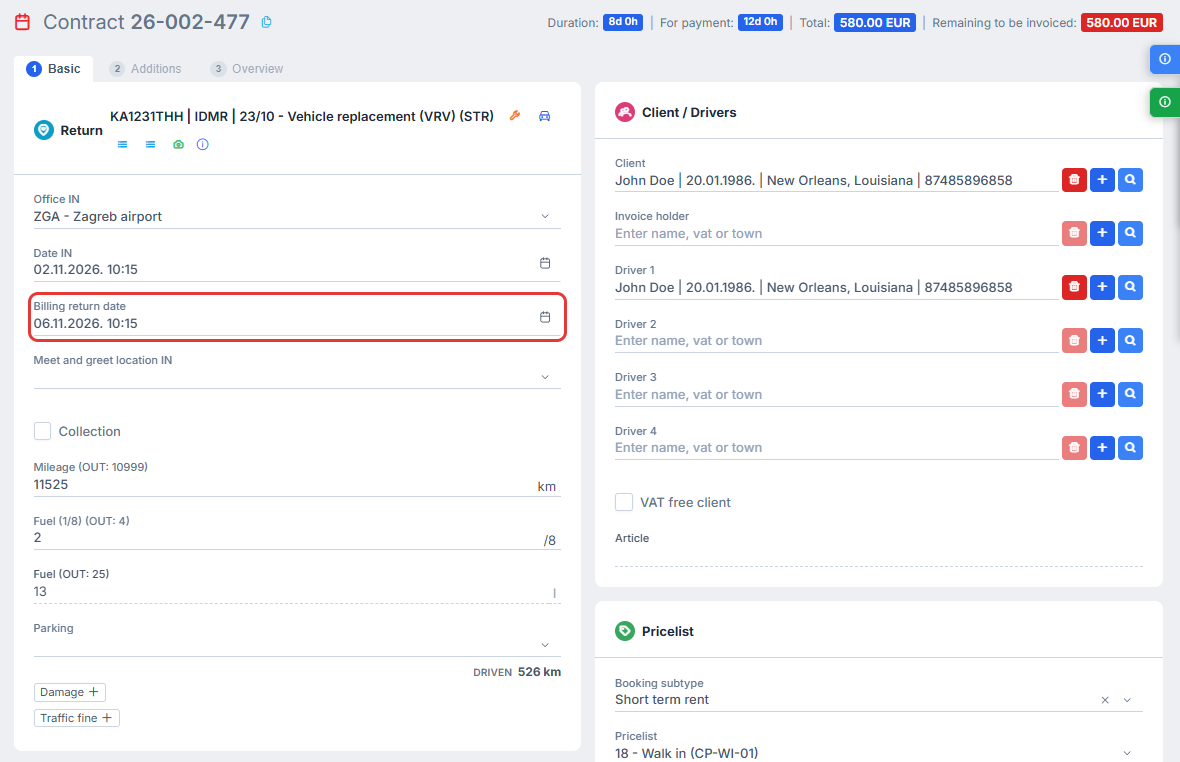
- Billing return date is a date and time. Renteon bills the contract up to that moment, as long as it is later than the actual return.
Both options change only what is billed. The actual return date, the car's availability and everything else that depends on where the car really is keep the actual dates.
Why an early return changes the price
Renteon prices a contract from Date OUT to the return. While the car is out, that is the planned return, Date est.IN. When you close the contract and enter the actual Date IN, Renteon prices the contract again from Date OUT to Date IN, together with every extra that is charged per day or per hour.
Pricelists usually have different daily rates for different rental lengths. So a shorter rental is not just the same daily rate for fewer days. It can fall into a more expensive band. For example, if 1–3 days cost €50 per day and 4–7 days cost €40 per day, a 7-day rental costs €280. If the customer returns after 3 days, the recalculated rental costs 3 × €50 = €150.
That is correct when the customer pays at the end. It is a problem when the customer has prepaid: the contract total drops below the amount already paid, and the invoice issued at pickup no longer matches the contract. When you then close the contract, Renteon asks "Paid amount for this contract is larger than total amount. Proceed with close?". Use Lock billing period or Billing return date when the agreement with the customer is that an early return does not reduce the price.
Lock billing period
When Lock billing period is ticked, Renteon bills the contract up to whichever is later, the actual return (Date IN) or the planned return (Date est.IN):
- Early return: the contract is billed up to Date est.IN, so the price stays what it was when the car went out.
- Return on time or late: the contract is billed up to the actual Date IN, exactly as it would be without the lock. The lock never stops Renteon from charging for extra time.
- While the car is still out: ticking the box changes nothing, because the price already runs to Date est.IN. The lock only takes effect when the car comes back.
You find the checkbox in two places:
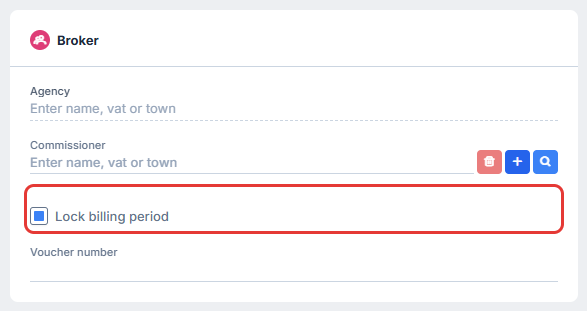
- On the contract (Sales → Bookings → Search, open the contract): step Basic, section Broker, Lock billing period.
- When you close the contract (on the contract, Actions → Close contract): step Basic, section Pricelist, Lock billing period.
The checkbox is shown only on contracts, and not on contracts that use Allow monthly price entry or Installments payment (see the section on long-term rentals below). It is available on client contracts and agency contracts alike. You do not need a special role: anyone who can edit or close the contract (role Create and modify bookings) can tick or untick it. There is no setting to switch the feature on. On a closed or cancelled contract the box is read-only (see "Closing and correcting a contract" below).
If you want this behaviour for all contracts of a particular client, agency or commissioner, set it once in their address book entry instead. See "Default lock for a client, agency or commissioner" below.
Warning: The lock protects the billed period only up to Date est.IN as it is when the contract is closed. If the customer phones to say they will come back early and you move Date est.IN to the earlier date, the lock no longer has anything to protect and the contract is billed for the shorter period. Leave Date est.IN as it is and enter only the actual Date IN at close.
Billing return date
Billing return date is a date and time up to which Renteon bills the contract. If it is later than the actual return, the rent and every extra charged per day or per hour are priced from Date OUT to the billing return date, using the pricelist rates for a rental of that length. If it is exactly the same as the actual return, it has no effect, and Lock billing period, if ticked, still applies. If you leave the field empty, the contract is billed normally, or up to Date est.IN if Lock billing period is ticked.
You find the field in two places:
- On the contract: step Basic, section Other, Billing return date.
- When you close the contract: step Basic, panel Return, right below Date IN.
Typical uses:
- An agreed minimum rental. The car is planned for 7 days, but the agreement says the customer pays for at least 10. Set Billing return date to 10 days after Date OUT, at the same time of day as the pickup. While the car is still out, the contract is then already priced for 10 days.
- A compromise on an early return. The car comes back after 3 of 7 booked days. The lock would bill all 7 days. You agree with the customer to charge 5 instead. Set Billing return date to 5 days after Date OUT, at the pickup time. When both are set, Billing return date takes precedence over Lock billing period.
Pick the time carefully: a billing return date a few hours after the pickup time can count as an extra day, depending on your pricelist's rules for how the rental length is counted.
Renteon checks the date every time it recalculates the contract (when you click Next) and when you save, and shows one of these messages if it is not allowed:
- "Billing return date can only be set on a contract." The field is not for offers or reservations.
- "Billing return date is not allowed on monthly contracts and contracts paid in instalments."
- "Billing return date must not be earlier than the actual return date." The date can never shorten the billed period below the actual return. While the car is still out, it must not be earlier than Date est.IN.
Like the lock, Billing return date needs no special role and is shown only on contracts that do not use monthly price entry or instalment payment.
Warning: The billing return date must always stay at or after the return. If the customer extends the contract past it, returns later than it, or you correct the return time to a later moment, Renteon refuses to save with "Billing return date must not be earlier than the actual return date." Clear the field or move it to a later date and save again.
Default lock for a client, agency or commissioner
Some customers, such as corporate clients with prepaid rentals or partners whose terms say the booked period is always paid, should get the lock on every contract. You can set this once in their address book entry:
- Go to Sales → Address book → Search and open the client, agency or commissioner. A commissioner is an address book entry with the Agent section ticked.
- Click Edit.
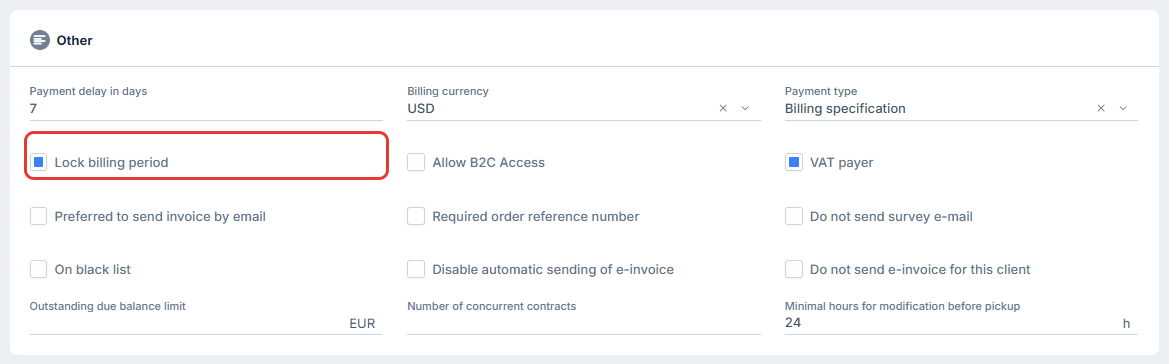
- In the section Other, tick Lock billing period.
- Click Confirm.
You need the role Address book management to edit address book entries. The checkbox is there for every address book entry, both companies and individuals.
From then on, Renteon ticks Lock billing period automatically on that party's bookings. You see the box already ticked when you open such a contract, and the lock is stored with the contract when it is saved:
- Renteon looks at the booking's agency first, then the commissioner, then the client. The agency's setting takes precedence over the commissioner's, and the commissioner's over the client's.
- This happens whichever way the booking was created, including bookings from partners and integrations. Partners cannot set the lock or a billing return date themselves; only this address book default reaches their bookings. The box is visible from the moment the booking becomes a contract.
- It also applies to existing bookings for that party whose box nobody has ticked or unticked yet. The box shows as ticked the next time you open such a contract, and the lock is saved with it, for example when the contract is closed.
- Once someone has ticked or unticked the box on a booking, the booking keeps that choice, and the address book no longer changes it. You can untick it for one contract if needed.
- Unticking the option in the address book later does not remove the lock from bookings that already have it.
Warning: The default also reaches contracts that already exist. That includes a closed contract that you open with Edit to recalculate it, as long as nobody has ever ticked or unticked its box. If that car came back early, the recalculation then bills up to Date est.IN and the total goes up. Before you save such a contract, check Lock billing period and For payment.
Worked example
A customer books a car with a pricelist where 1–3 days cost €50 per day and 4–7 days cost €40 per day. The contract has Date OUT 3 November 2026 at 10:00 and Date est.IN 10 November 2026 at 10:00: 7 days, €280. The customer pays €280 at pickup and you issue the invoice. The rental line on the invoice shows the period 3 November 10:00 – 10 November 10:00.
The customer brings the car back on 6 November 2026 at 10:00.
Without the lock:
- Renteon recalculates the contract for 3 days: 3 × €50 = €150.
- The booking header shows Duration 3d 0h and For payment 3d 0h.
- The contract total is €150, while €280 has been paid and invoiced. Renteon asks you to confirm the close because more has been paid than the contract total.
With Lock billing period ticked:
- Renteon bills up to Date est.IN, 10 November 10:00: 7 days, €280. The contract still matches the payment and the invoice, and nothing is left to invoice for the rental.
- The booking header shows Duration 3d 0h (the actual rental) and For payment 7d 0h (what is billed). Remaining to be invoiced is 0.
- Date IN stays 6 November 10:00. The printed contract shows that return time, and the car becomes available for new rentals from that actual return, not from 10 November. The Duration printed on the contract shows the billed 7d 0h.
- If the pricelist includes, say, 200 km per day, the customer's included mileage is 7 × 200 = 1,400 km, not 3 × 200 = 600 km, because they paid for 7 days.
- A child seat charged per day is also billed for 7 days.
With the lock ticked and Billing return date set to 8 November 2026 at 10:00:
- The billing return date takes precedence over the lock: Renteon bills 5 days at the 4–7 day rate, 5 × €40 = €200.
If the customer instead returns late, on 11 November 2026 at 10:00, with only the lock ticked and no billing return date:
- The lock has no effect. The contract is billed up to 11 November 10:00, exactly as it would be without the lock, following your pricelist's rules for the extra time.
The amounts are only an illustration. The real price always comes from your pricelist, including its rules for how the rental length is counted.
Closing and correcting a contract
At close, the two options work together with the normal close steps:
- On the contract, open Actions → Close contract.
- On step Basic, in the Return panel, enter Office IN and Date IN as usual. The planned return (Date est.IN) is shown in the Locations section and cannot be changed here.
- Look at Lock billing period in the Pricelist section and tick or untick it as agreed. If you agreed on a billing end, fill in Billing return date in the Return panel.
- Click Next. Renteon recalculates the contract. Compare Duration and For payment in the header, and check the prices on step Additions.
- Click Next again and finish the close with Close contract on step Overview.
To change the lock or the billing return date on a contract that is already closed, you need the role Recalculation of a closed contract. Open the closed contract and click Edit (in the bar at the bottom or under Actions). Change the checkbox or the date, go through the steps and click Close contract on step Overview. Renteon asks "You are trying to save a closed contract. Continue?" and then recalculates the contract with the new billing period. If you move Date IN while you are there, Renteon asks for a Reason for date correction, as it does for any change to the return of a closed contract. A corrected Date IN cannot be later than the Billing return date, and it cannot be in the future.
If Renteon support reopens a closed contract, the billing return date stays on it.
What follows the billing period
These use the billed period, from Date OUT to the billing end described above:
- The rent price and every extra charged per day or per hour, such as insurance or a child seat. A one-off charge normally stays the same, unless your pricelist sets its price by rental length.
- The mileage included in the price when the pricelist includes a number of kilometres per day or per hour. Extra kilometres are charged only above that allowance.
- For payment in the booking header (days and hours billed) and Remaining to be invoiced.
- Duration on the printed contract and other booking documents. On paper it shows the billed days and hours.
- The period that Renteon adds to the description of each contract line on an invoice, unless the invoice has a payment period of its own (this does not apply to group invoices). For the rent and the extras, it normally runs from pickup to the billing end, as it stood when the invoice was issued. An invoice issued at pickup already shows the planned period, so with the lock it still matches the contract after an early return.
- The rental period of the contract on a collective invoice, when the invoice has no payment period of its own.
- The report Car control → Reports → Sales → Booking payment plans, which uses the billed period for the dates and the duration in days.
What keeps the actual dates
These are not affected by the lock or the billing return date:
- Date IN on the contract and on the printed contract.
- Duration in the booking header, which always shows how long the rental really lasted.
- Fleet availability and the fleet chart. The car is free from its actual return (plus the buffer between rentals), not from the billing end. See How availability is calculated.
- The out-of-hours return fee. Renteon decides whether the return was out of office hours from the actual return time. So the total can still change at close. For example, if the planned return was at 22:00 (outside office hours, with a fee) but the car comes back at 15:00, the out-of-hours fee no longer applies, even with the lock. See Holidays and working hours.
- Traffic fines, damages and GPS data. These are matched to the car's real movements.
- Dates in e-mails and SMS messages sent about the booking.
- Pricing optimizations (for example last-minute rules). These were settled when the booking was made and stay as they were. See Pricing optimizations.
Agency contracts
Lock billing period and Billing return date work on agency contracts too. How they affect the agency's part depends on Agency pays true period of booking. That checkbox is shown only on agency contracts and sits right next to Lock billing period: in the Broker section on the contract and in the Pricelist section when you close it. To change it you need the role Agency booking payment type management.
- If Agency pays true period of booking is not ticked, the agency is billed for the booked period anyway. The lock and the billing return date then change only the part the customer pays, for example extras added at the desk.
- If Agency pays true period of booking is ticked, the agency's part also follows the billing end. With the lock on, an early return does not shorten what the agency pays either.
Warning: If a client has Lock billing period in their address book entry and rents through an agency whose entry does not have it ticked, the client's default can be applied to the agency contract. If that agency normally pays only the true period, check For payment and the agency's prices on step Additions before you close the contract.
Long-term rentals, instalments and advance invoices
Neither option is available on contracts that use Allow monthly price entry or Installments payment. Those contracts are billed month by month or instalment by instalment, so a locked period would bill extra months for a car that has already come back. For these contracts:
- The Lock billing period checkbox and the Billing return date field are not shown.
- If the lock was ticked automatically from the address book, it is ignored for that contract.
- A billing return date is refused. If you need to switch a contract to monthly price entry or instalments, clear Billing return date first.
A long-term contract that is priced the normal way, without Allow monthly price entry, can use both options like any other contract.
For how monthly contracts are priced and invoiced, see Long-term rentals.
The lock is most useful with prepaid rentals. When you invoice the whole booked period at pickup, or take an advance payment for it, Lock billing period keeps the contract billed for that same period if the car comes back early. The invoice then stays valid and nothing is left over on the contract. See Advance payment invoice for how advance invoices are issued.
Use Lock billing period when the rule is "the booked period is paid in full", and Billing return date when you agreed on a specific billing end for one contract. In both cases the car's real return stays as it happened, so availability, fines and damages stay correct.
Related guides: