Sales
On-Request Bookings
How to set up on-request bookings with the Stop booking module and the partner's B2B settings, so bookings wait for you to confirm or reject them.
Last updated
Stop booking module setup
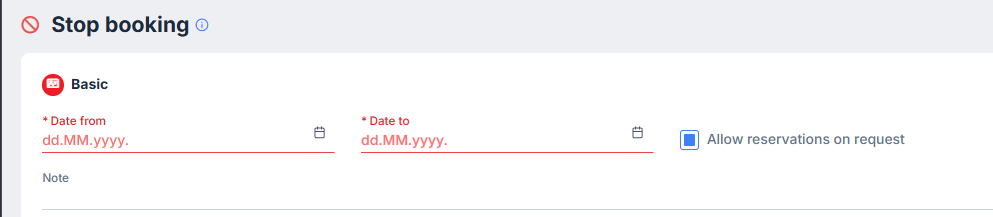
To set up on-request in Renteon, you should use the Stop booking module.
Press "Add" and define:
- Define the dates when it's valid – these dates refer to pickup dates
- Checkbox "Allow reservations on request" must be selected
- Define Pickup/Drop off selection -> If neither box is selected, the on-request applies to every booking that overlaps its period in any way. If only Pickup is selected, it applies to bookings whose pickup falls within the period. If only Drop-off is selected, to those whose drop-off dates fall within the period. With both selected, it applies when either the pickup OR the drop-off falls within the periods - not only when both do.
- Car categories -> select car categories for which on-request must apply
- Booking channel -> select for which booking channel on-request will apply:
- OFFICE -> all the bookings created manually by your users
- B2B WEB -> all the bookings created by the partners via the B2B portal
- B2C WEB -> all the bookings created by your website (if connected via API)
- WEB SERVICE -> all the bookings created by the brokers through their websites
- B2C PORTAL -> all the bookings created by your clients via B2C Portal
- EXTERNAL SYSTEM -> all the bookings created through some external system, e.g., an old system that is transferring reservations to Renteon
- Office OUT -> select for which pickup offices the on-request will apply to
- Office IN -> select for which drop-off offices on-request will apply
- Partners -> to which partners on-request will apply
- Durations -> leave as it is for all the durations, or define a specific one
Address book setup
Within the partner's Address book entry -> tab B2B settings (upper right corner) -> "Allow reservations on-request"
Inform partners
Broker/Partner for which you have enabled on-request must be informed about it, as it requires some modifications and enabling a special mechanism on their side that supports the on-request type of bookings.
Otherwise, they will treat these categories as a stop sale.